
“Always choose .com” is useful shorthand, not a domain strategy. I'd rather launch on an extension that fits the market than force a confusing brand name onto .com. But I wouldn't move an established site just to get a fashionable suffix, either. The expensive decision isn't the extension itself. It's the architecture, audience, and migration work you attach to it.
When you compare examples of top level domains, judge what each choice commits you to. A country-code domain can sharpen your geographic focus while complicating expansion. A software-focused extension can clarify your product while creating expectations you'll eventually outgrow. Restricted extensions require a different approach altogether: you'll usually study and earn citations from those sites, not register one yourself.
My starting rule: Choose the domain you can keep through your next market expansion, not just your next launch.
Before committing, separate website configuration from email configuration. You can check your domain with mailX, then validate your website's DNS, HTTPS, redirects, and canonical URLs independently. A working homepage doesn't prove that everything attached to the domain works.
The examples below run from .com to .pl. For each, I'd make the decision around links, geographic targeting, audience perception, and the cost of changing course.
Table of Contents
- 1. .com (Generic Top-Level Domain)
- 2. .de (Country-Code Top-Level Domain, Germany)
- 3. .org (Generic Top-Level Domain for Organizations)
- 4. .edu (Restricted Sponsored Top-Level Domain)
- 5. .gov (Restricted Government Top-Level Domain)
- 6. .app (Generic New Top-Level Domain)
- 7. .dev (Generic New Top-Level Domain for Developers)
- 8. .pl (Country-Code Top-Level Domain, Poland)
- How the eight top level domain examples compare on operator, eligibility, best use, and main tradeoff
- Pick the Extension Your Next Five Years Can Live With
1. .com (Generic Top-Level Domain)
Choose .com for flexibility, not a ranking shortcut. You can build a store, publication, SaaS product, or consultancy without attaching an explicit country or industry label to the address. Familiar examples include google.com, amazon.com, and semrush.com.
The IANA Root Zone Database identifies .com as a generic namespace managed by Verisign. Unlike restricted institutional extensions, you don't need a particular organizational status to register an available .com.
I'd start your competitive analysis with the keywords and pages you need to beat, then inspect the domains behind them. Don't assume their extension explains their visibility. Content relevance, useful pages, internal links, and earned backlinks give you something actionable to compare.
Consolidate Before You Promote
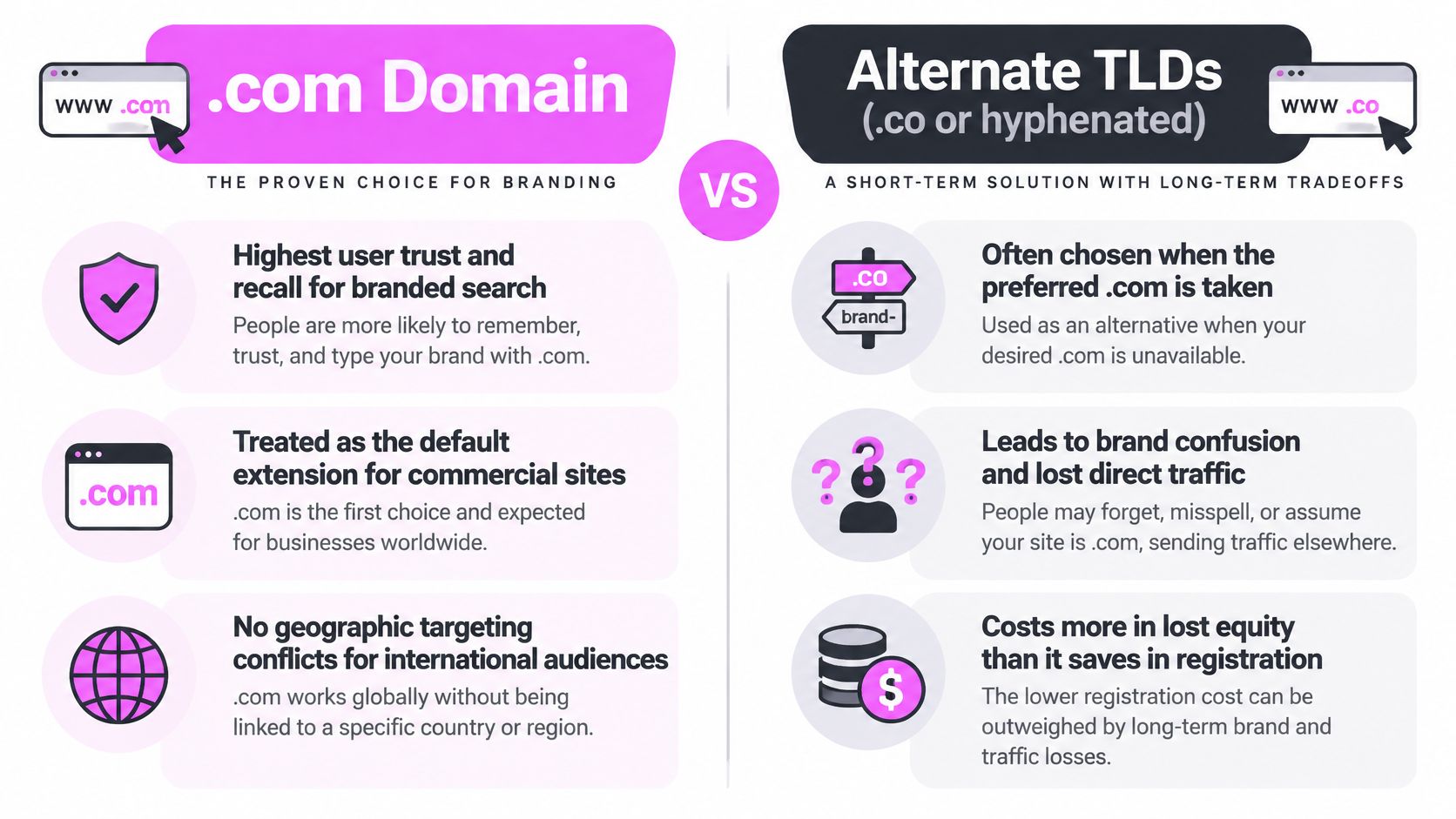
Say your preferred name is unavailable. I'd compare a clear brand modifier against an alternate extension before settling for a hyphenated address that needs explaining aloud.
- Inspect the history: Use SemDash's Backlink Research to examine referring domains and anchors. Investigate irrelevant link patterns rather than assuming an expired domain brings useful authority.
- Map the competition: Run Domain Keywords on competing domains and identify the exact pages ranking for your target terms.
- Choose one public address: Redirect defensive registrations to relevant destinations instead of publishing duplicate sites.
Make the hostname decision at launch, too. Follow a consistent www versus non-www configuration across redirects, canonicals, sitemaps, and internal links. Buying the right domain won't fix contradictory URL signals.
2. .de (Country-Code Top-Level Domain, Germany)
If you sell primarily into Germany, .de makes a clear country commitment. You can see that positioning in spiegel.de, bundesregierung.de, and zalando.de. DENIC eG operates the registry.
I wouldn't choose .de merely because your copy is German. Germany, Austria, and Switzerland share a language, but you still need separate decisions about delivery, currencies, terminology, and customer support. A German-language audience isn't automatically a Germany-only audience.
For perspective, country-code domains accounted for 144.8 million registrations at the end of Q3 2025, according to Verisign's Domain Name Industry Brief announcement. That establishes their scale, not a ranking advantage for your particular site.

Decide Whether Germany Is a Market or the Business
Say you're launching a German storefront but expect additional countries later. I'd compare separate country domains against localized subfolders on a generic domain before buying into either structure.
With separate domains, you'll need to promote and maintain each property. With subfolders, you can keep content and link acquisition under one domain, but you'll need disciplined localization and routing. Neither structure replaces relevant local content.
Use Keyword Gap with German location filters, then inspect the ranking URLs and commercial intent. Don't substitute German-language keyword volume from another market.
Before implementation, run an international SEO audit covering hreflang, canonicals, indexability, and country-specific destinations. If Germany is your permanent focus, I'd favor .de. If expansion is already funded, I'd settle the international architecture first.
3. .org (Generic Top-Level Domain for Organizations)
For a nonprofit, open-source project, or public resource, I'd put .org on the shortlist. Examples such as wikipedia.org, mozilla.org, and eff.org illustrate the organizational identity you can communicate with it. Public Interest Registry manages the extension, and registration isn't limited to nonprofits.
Don't confuse that identity with verified trust. The IANA root-zone records distinguish namespaces and their managers, but a suffix alone doesn't establish whether you should trust a website. You still need to assess who operates it and what the pages provide.
A commercial business can use .org. I'd just avoid choosing it solely because the matching .com is unavailable, especially if your main destination is a sales funnel.
Use .org when your organizational purpose fits the address. Don't use it to imply nonprofit status you don't have.
Build Resources Worth Citing
Say you're publishing an open-source accessibility toolkit. Keep installation instructions, licensing, contributor information, and practical examples easy to find. Those pages give someone a reason to reference your work beyond your homepage.
In Backlink Research, inspect well-linked resources in your niche. Look at Pages by Links, then classify the assets: documentation, glossaries, datasets, tools, or reference guides. Borrow the useful format, not the wording.
Connect those resources to relevant project and product pages through contextual internal links. If you sell services alongside the community work, make your company identity and commercial relationship explicit. Clear ownership is more useful than leaning on the extension's reputation.
4. .edu (Restricted Sponsored Top-Level Domain)
Treat .edu as an eligibility question before a branding question. EDUCAUSE administers it, and current registration eligibility centers on accredited U.S. postsecondary institutions. Legacy registrations mean you shouldn't assume every existing .edu exactly matches today's eligibility rules.
Harvard.edu, mit.edu, and stanford.edu are recognizable examples. You can't turn an ordinary training business into an eligible institution by publishing courses or adding an accreditation-style badge.
The broader distinction matters: institutional namespaces don't work like unrestricted generic choices. IANA's root-zone documentation explains the delegation layer behind these extensions. For your SEO work, separate the right to register a domain from the editorial value of a page hosted beneath it.
Earn Relevance, Not an Extension
If you're marketing a commercial site, I'd use .edu research to understand useful citation opportunities rather than chase the suffix itself.
- Inspect relevant links: Filter competitor referring domains for .edu, then open the actual linking pages. Check topic fit, placement, and whether the resource is maintained.
- Build a usable asset: Publish a calculator with its methodology, an annotated dataset, or a research guide with clear authorship.
- Approach the right editor: Explain precisely which resource your page supports. Don't send a generic request for an academic backlink.
Say you publish a student budgeting calculator. Include assumptions, accessible inputs, and an explanation of the output so a student-services editor can evaluate it.
I wouldn't pay for a placement just because the URL ends in .edu. An irrelevant or neglected page won't become a worthwhile referral source because of its extension. Judge the page and its audience, not the letters at the end.
5. .gov (Restricted Government Top-Level Domain)
Registration is closed to private businesses, and that single fact decides how you treat the extension. The Cybersecurity and Infrastructure Security Agency administers the U.S. government namespace. Usa.gov, irs.gov and cdc.gov sit inside it, and each is a primary-reference candidate when you research public services, taxation or health topics.
No SEO plan ends with you owning one. The decision .gov forces is editorial: compete beside official guidance or build on top of it.
Take payroll software. A product page has no business ranking against an official tax-instruction page for a pure rules query, because the searcher wants the requirement, not a vendor's summary of it. Rank instead for the implementation work: preparing records, reconciling an export, correcting a filing error before a deadline. Then link the exact agency page that states the rule.
- Match intent: separate official-rule queries from software-selection and workflow queries before you write anything.
- Cite the precise page: a deep link to the relevant agency section beats a homepage, and readers do check.
- Check who gets cited: review which URLs Google's AI answers pull for your regulatory terms, then judge whether a guide can earn a place beside them.
Extension and page quality are separate questions. A TLD is a delegation point in the DNS hierarchy, which organizes names into levels, and it tells you nothing about whether a page answers the question. Verify the issuing agency, the jurisdiction, the page's scope and its publication context before you cite it or benchmark against it. A stale .gov page can rank and mislead at the same time.
I would not build a content plan around linking to .gov for a ranking benefit. The citation earns trust with readers who check sources; the link itself moves nothing. What moves rankings is the page that does something the official guidance cannot, such as a worksheet, a deadline calculator or a reconciliation checklist written for someone who has already read the rule.
Keep the claim narrow. Explain the requirement accurately, add the next step, and send the reader back to the agency for the final word.
6. .app (Generic New Top-Level Domain)
With .app, HTTPS belongs in the launch plan, not the cleanup queue. Google Registry operates the extension, and HSTS preloading means browsers require secure connections. You need a valid certificate before visitors can reliably use the site.
The naming tradeoff is separate. I'd shortlist .app for a software product, web application, or mobile-product landing page when the address makes the proposition clearer. I wouldn't reject it for a content-heavy site automatically, but I'd ask whether you want that software association permanently.
New extensions are established parts of the namespace, not merely proposed labels. For context, ICANN's New gTLD Program statistics record 1,241 delegated gTLDs from the earlier program. Still, delegation doesn't mean your preferred name is available for public registration.

Test the Whole Product Journey
Say you're launching a scheduling tool on .app. Before promotion, test the homepage, signup flow, password reset, documentation, and every public subdomain over HTTPS.
Check certificate coverage, redirects, canonical tags, and embedded resources. HSTS doesn't fix mixed content, issue certificates, or protect your application from security flaws. It enforces secure transport in supporting browsers.
I'd keep marketing pages, help content, and product documentation under a coherent domain strategy. Don't split them between .app and .com without a reason you can explain operationally.
Use Competitor Domains to compare the pages competing for product-related queries. Extension patterns can inform your branding review, but they don't prove that .app helps or hurts rankings. Compare page intent and backlink requirements before drawing that conclusion.
7. .dev (Generic New Top-Level Domain for Developers)
If developers are your buyers, .dev can make your audience clear before the first click. Web.dev is a concrete example of the extension in use. It's a developer resource on .dev, not an example of a .app domain.
Like .app, .dev is operated by Google Registry and uses HSTS preloading. I'd plan certificates for every public hostname, including previews and documentation subdomains. Don't use a real .dev domain for an HTTP-only local environment and expect browser exceptions to make the workflow dependable.
The positioning can become restrictive if you later market primarily to nontechnical buyers. I'd choose it for an engineering-led product or developer publication, but question it for a consumer service that needs a neutral identity.
Keep Documentation Discoverable and Previews Private
For an API product, map reference pages, tutorials, SDK guides, and troubleshooting content before launch. Use Keyword Clustering to group technical queries into distinct page-level jobs rather than publishing overlapping answers for every syntax variation.
- Protect previews: Use authentication for private environments. A robots.txt block isn't access control.
- Control public indexing: Keep production canonicals and sitemaps free of staging URLs.
- Measure useful entrances: Compare Top Pages and Traffic Share, then connect relevant documentation to signup or product-evaluation steps.
Implementation warning: A valid HTTPS certificate makes a preview accessible securely. It doesn't make that preview private.
Use the accompanying video alongside your page-level review.
I'd keep documentation URLs stable through redesigns. Developers may bookmark deep references, and external tutorials may link directly to them. Preserve those destinations or provide relevant redirects rather than sending everything to the documentation homepage.
8. .pl (Country-Code Top-Level Domain, Poland)
Choose .pl for a Polish market strategy, not just Polish text. NASK operates the registry, and examples include allegro.pl, gov.pl, and onet.pl. The country association is useful when Poland is where you sell, support customers, and build recognition.
I'd make the same distinction here as with any country-code choice: your audience's location and language aren't interchangeable. You can serve Polish-speaking customers outside Poland, and customers in Poland may search for technical products using English terminology.
Say you sell accounting software locally but plan an international edition. Before launch, compare a Poland-focused .pl with a generic domain using localized subfolders. Don't defer that decision until your documentation, partnerships, and campaigns already point to the local domain.
Research the Market Before Translating
Start with Polish location filters in Keyword Gap. Inspect the actual search results for your commercial terms, including English phrases used in the local market.
Then compare Competitor Domains and Traffic Share. Identify whether you're competing with local vendors, international products, publishers, or marketplaces. You'll need different content and link-acquisition plans for each.
- Map local demand: Group Polish and English queries by intent, not language alone.
- Inspect referring pages: Use Backlink Research to identify relevant industry publications, integrations, and resource pages.
- Plan expansion destinations: Decide where an English edition would live and how you'd connect equivalent pages.
I wouldn't abandon a successful .pl merely because you add English content. I'd first assess whether you need an additional market property or a migration. If you migrate, map individual URLs and preserve useful content rather than redirecting every Polish page to a global homepage.
How the eight top level domain examples compare on operator, eligibility, best use, and main tradeoff
| Item | Operator | Eligibility | Best For | Main Tradeoff |
|---|---|---|---|---|
| .com (Generic Top-Level Domain) | Verisign, under ICANN agreement | Open to anyone | Broad commercial and international audiences | Popular names are often taken or expensive |
| .de (Country-Code Top-Level Domain, Germany) | DENIC eG | Registration requirements apply | Businesses focused on German-speaking markets | Less suitable for global expansion |
| .org (Generic Top-Level Domain for Organizations) | Public Interest Registry | Open to anyone | Nonprofits, open-source projects, and public resources | Can seem out of place for commercial businesses |
| .edu (Restricted Sponsored Top-Level Domain) | EDUCAUSE | Accredited U.S. postsecondary institutions only | U.S. higher education institutions | Most organizations are not eligible |
| .gov (Restricted Government Top-Level Domain) | Cybersecurity and Infrastructure Security Agency | U.S. government entities only | U.S. government agencies and programs | Businesses and other non-government entities are not eligible |
| .app (Generic New Top-Level Domain) | Google Registry | Open to anyone | Apps, SaaS products, and software tools | HTTPS is mandatory, and the extension is less neutral |
| .dev (Generic New Top-Level Domain for Developers) | Google Registry | Open to anyone | Developer tools, documentation, and technical content | Technical positioning may confuse general audiences |
| .pl (Country-Code Top-Level Domain, Poland) | NASK | Registration requirements apply | Businesses focused on Polish audiences | International expansion may require a costly migration |
Pick the Extension Your Next Five Years Can Live With
Before you register anything, write down your target countries, your audience type, and whether you expect to add another market. Include the awkward possibilities: a developer tool sold to procurement teams, a Polish business expanding internationally, or a nonprofit adding paid services. Choose for the business you can realistically become.
Run Domain Keywords and Backlink Research on the competitors you most want to outrank. Inspect which extensions they use, but spend more time on the ranking pages, search intent, and referring domains. You need to understand the work required to compete, not just copy the visible suffix.
Separate Branding From Technical Validation
I'd evaluate the name aloud before buying it. Can someone spell the address after hearing it, distinguish it from a similar brand, and understand whether it serves their market? Test the complete name and extension together rather than judging either in isolation.
Then validate the operational details:
- Registration: Confirm that the suffix is delegated, the name is available, and you meet any eligibility requirements.
- Ownership: Put registrar access, recovery details, renewal responsibility, and DNS control under accountable business ownership.
- Security: Configure certificates, email authentication, and access controls before promotion.
- Architecture: Choose the primary hostname, international structure, and documentation location before earning links.
If the exact .com is gone, don't automatically buy a cheap alternative and hope it holds. Compare a clearer name against an appropriate extension, then consolidate on a primary domain. Redirect secondary registrations with 301 redirects to relevant destinations rather than maintaining competing copies.
For an existing site, I'd demand a stronger reason to move. A migration means URL mapping, redirect testing, canonical updates, sitemap changes, internal-link updates, and monitoring. Changing the suffix without resolving a real positioning or architecture problem gives you work without a clear objective.
The best extension is usually the one you won't need to explain, defend, or replace as your business grows.
Set a baseline before launch or migration: indexed pages, organic landing pages, branded queries, conversions, and valuable referring links. After release, check those same measures alongside crawl errors and redirect behavior. That gives you a practical way to judge the implementation instead of blaming every fluctuation on the TLD.
SemDash brings keyword, backlink, and SERP research together so you can compare domain choices against the competitors and pages you need to beat. Visit SemDash to review Domain Keywords, Backlink Gap, and Traffic Share before committing to an extension or planning a migration.